Developer The Iconfactory updated Twitterrific for iPhone, iPad and Mac this past weekend.
What’s new for Twitterrific?
The updates are available in Twitterrific’s iOS and macOS versions, bringing several new features. Most notably, users of the app can now finally attach a photo or video when sending direct messages, which is one of the longstanding features of Twitter’s official app.
To attach a photo/video from your Mac to a Twitter direct message, hit a new camera icon in the direct message composer to pick a media file to attach. The recipient can tap/click an attached item in a direct message to have it displayed in the media viewer.

On iPad, you can drag-and-drop a file onto the text area from another app. On iOS, long-pressing the camera icon automatically attaches your most recent photo or brings up a media picker so you can choose a file from another source.
To remove the attached item, click on its thumbnail.
You can, of course, also paste an image from the system clipboard using the standardCommand (⌘)-Vkeyboard shortcut. Plus, there’s now a newCommand (⌘)-Dkeyboard shortcut available in iOS/macOS apps for quickly sending a direct message to the tweet’s author.
Other updates
If you use Twitterrific’s excellent muffle feature, you’ll be pleased to learn that your suggested muffle rules on a tweet now include relevant deactivated rules across iOS and macOS apps.
The Mac version has received a few other enhancements:
The following bugs have been squashed in Twitterrific:
Twitterrific for iOS recently picked upsupport for drag and drop on iPad, haptics, chronological threads, a new unread indicator, ablack theme for iPhone Xand other updates.
The Mac app got refreshed recently withmulti-account capabilities.
Twitterrific’s Dark Mode
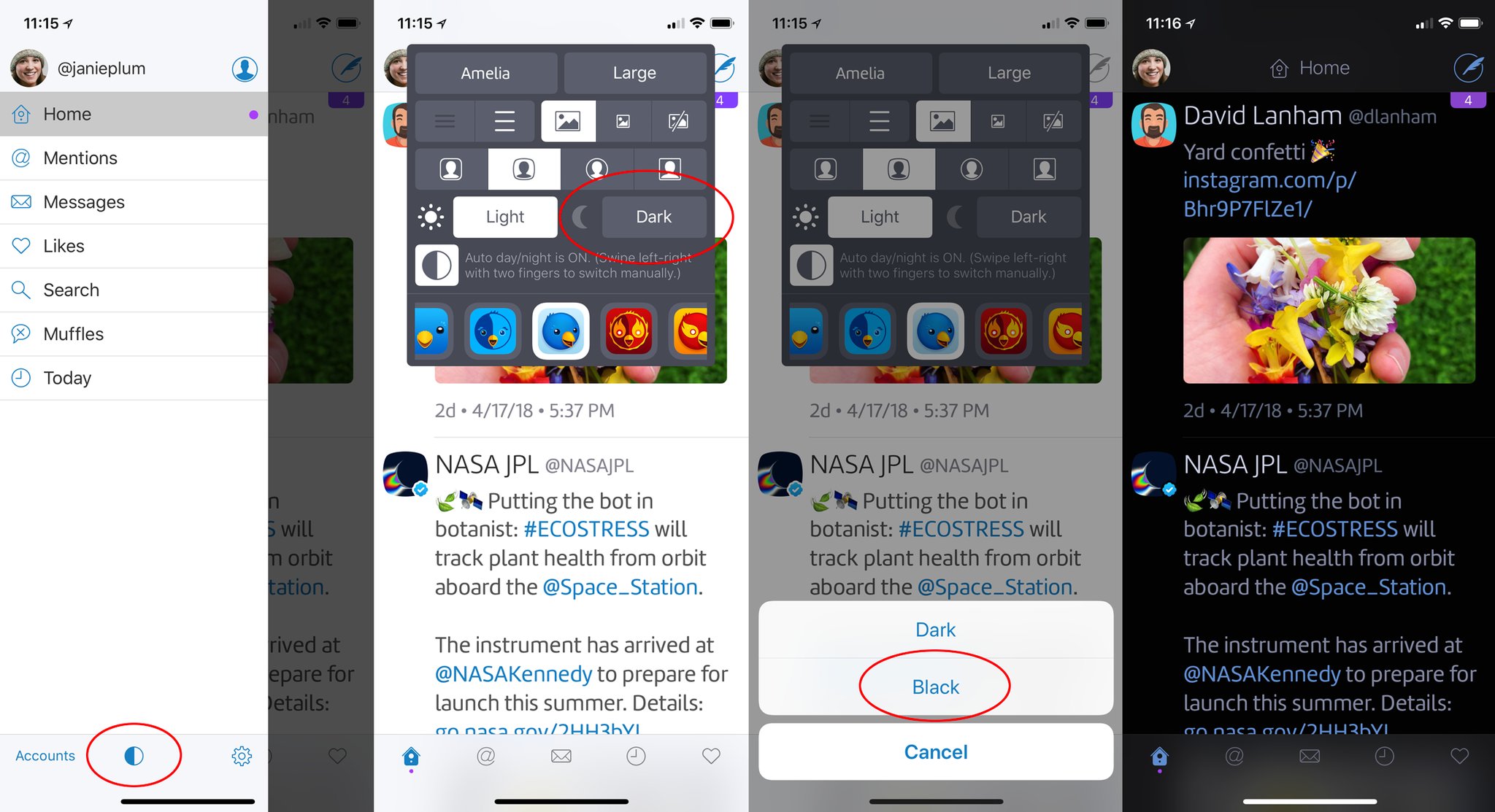
Twitterrific for iOS is fully optimized for iPhone X and includes a Dark Mode-like theme. To make the most of your new iPhone X’s gorgeous OLED display in Twitterrific, tap your avatar to open the sidebar, then choose the optionAppearance Preferencesat the bottom center. Tap theDark Themebutton then selectBlackand you’re good to go.
Twitterrific for iOS is a free downloadwith advanced features requiring a subscription.
Twitterrific for macOS is $7.99 on Mac App Store.
The Mac app is 60% off for a limited time (regularly $19.99). If you’ve been on the lookout for anice Twitter client alternative, now’s your chance to grab Twitterrific for Mac half price.
What’s yourfavorite Twitter client, and why?
