The old saying that goes “out of sight, out of mind” has a lot of truth behind it, and if you border two different time zones or have friends outside of yours, then it can be easy to forget what time it is in that other place.
Here to help you with that is the just-released and freejailbreak tweakdubbedDualClock 2by iOS developerginsudevwhich is a revival of the originallaunched mid-last year.

As you can discern for yourself in the screenshot example above, DualClock 2 puts two separate time displays on the Lock Screen so you can see not only your time, but also the time in another time zone.
DualClock 2 is fully compatible with both the iPhone and the iPad, and as you can see, it even does you the solid of displaying what the actual time zone belongs to so that you aren’t left guessing which clock belongs to each respective zone.

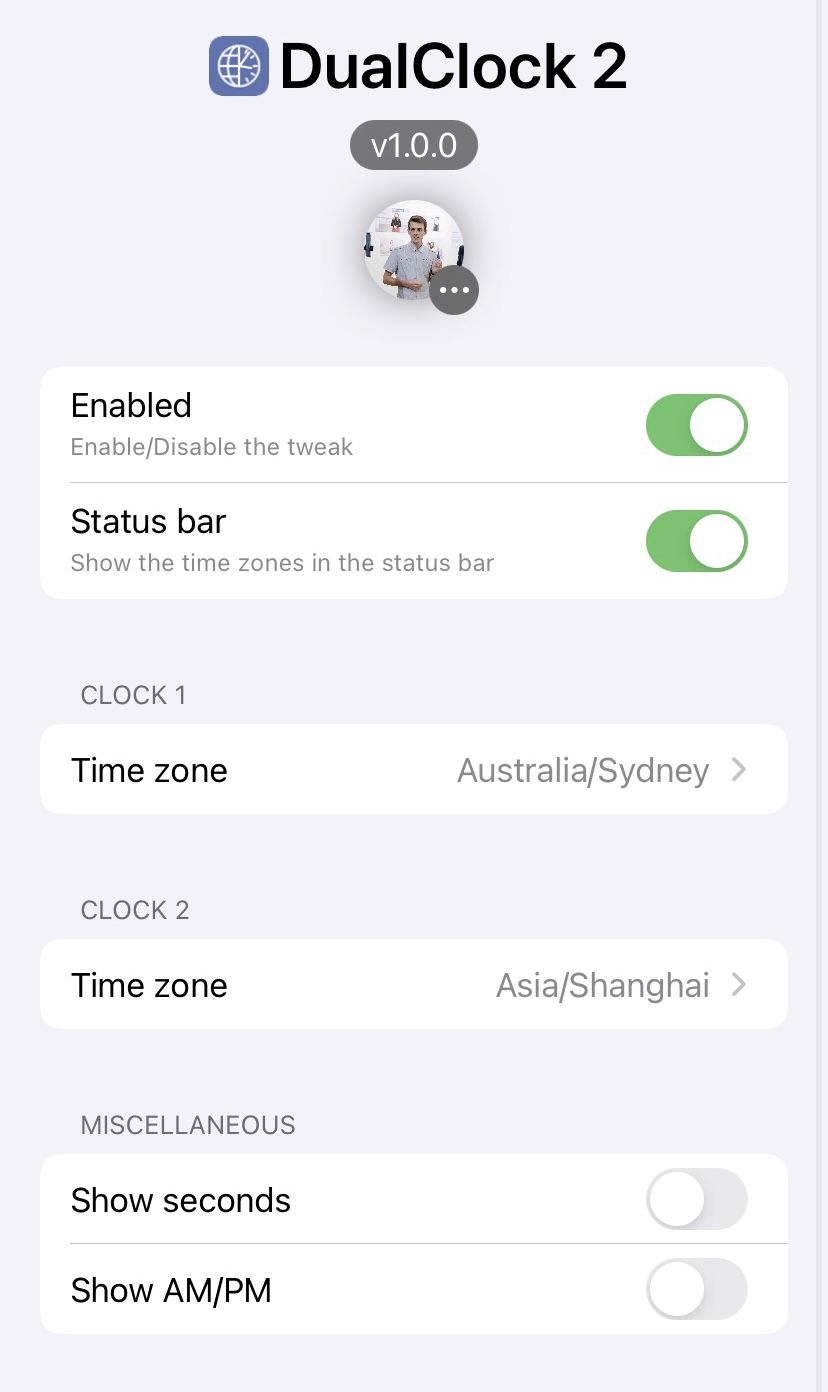
Once installed, DualClock 2 adds a dedicated preference pane to the Settings app where users can configure the tweak to their liking:
Here, you can:
The developer provides an Apply button at the top right of the preference pane so that you can save all the changes you make to the tweak’s settings on the fly.
We really enjoy the concept behind DualClock 2, and if you want to try it out for yourself, then you can downloadit for free from Ginsu’s personal repositoryvia your favorite package manager app. The tweak supportsjailbrokeniOS 14 devices. If you’re not already using Ginsu’s personal repository, then you can add it to your package manager app via the following URL:
Do you plan to add a second clock to your Lock Screen to depict a second time zone? Be sure to let us know in the comments section down below.
